
Time Log
- Aakash K., Date: February 22, 2026 From: 1:30pm To: 1:40pm
- Venkat S., Date: February 22, 2026 From: 1:40pm To: 1:50pm
- Doga K., Date: February 22, 2026 From: 1:50pm To: 2:00pm
- Mau A., Date: February 22, 2026 From: 2:00pm To: 2:10pm
Essay I.
Summary of your activities in your contents including new contents created (one paragraph). Provide all the hyperlinks (clickable) of new contents you have created this week.
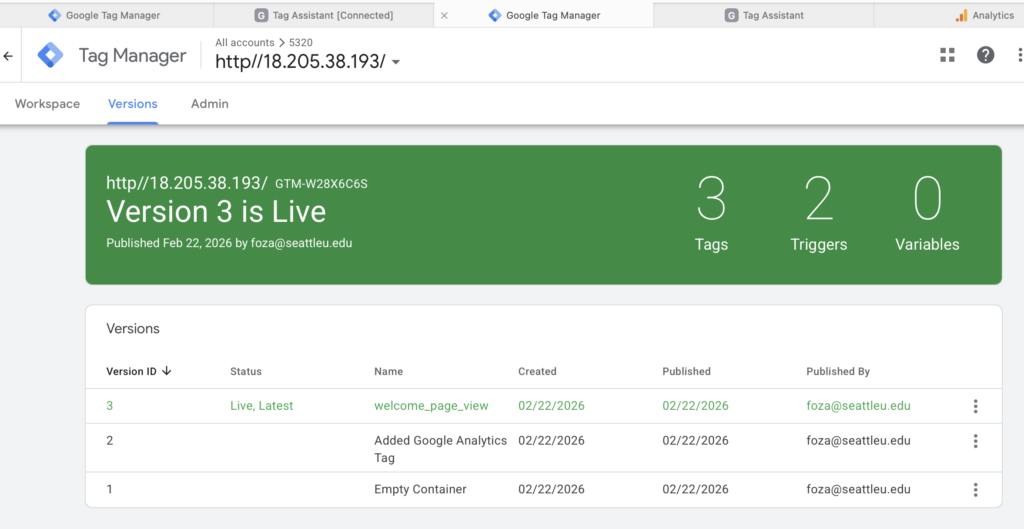
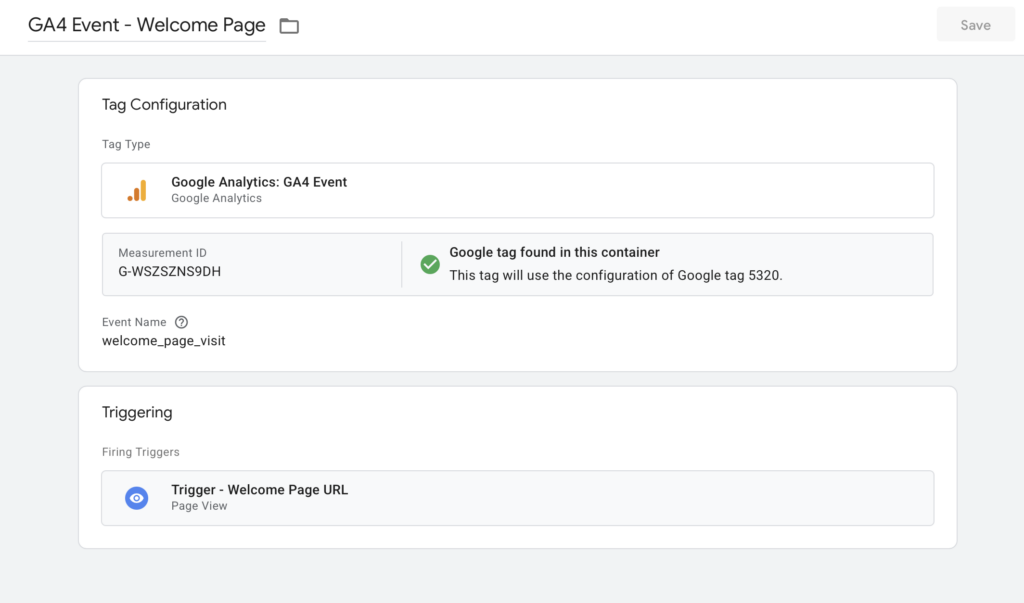
This week, I focused on both analytics implementation and content development for my website. I successfully created and installed a Google Tag Manager (GTM) container, added the required GTM snippets to my site, and configured a GA4 Configuration tag to initialize tracking and send pageview data. In addition, I created a custom GA4 Event tag with a page-view trigger to track specific user interactions, verified tag firing through Preview mode, and confirmed event tracking through GA4 reports. Alongside these technical updates, I also expanded my site content by publishing two new blog posts documenting my travel experiences in Osaka, which allowed me to apply tracking to newly created pages and observe how analytics capture user behavior on fresh content. Overall, this week’s activities helped me connect content creation with analytics implementation, strengthening both my technical understanding of GA4 tracking and my ability to measure engagement on newly published pages.
New content created this week:
- Post 1. Osaka Nights: Neon Lights, Nintendo Dreams, and the Energy of Dotonbori
- Post 2. A Different Side of Osaka: Osaka Castle & TeamLab Botanical Gardens
Essay II.
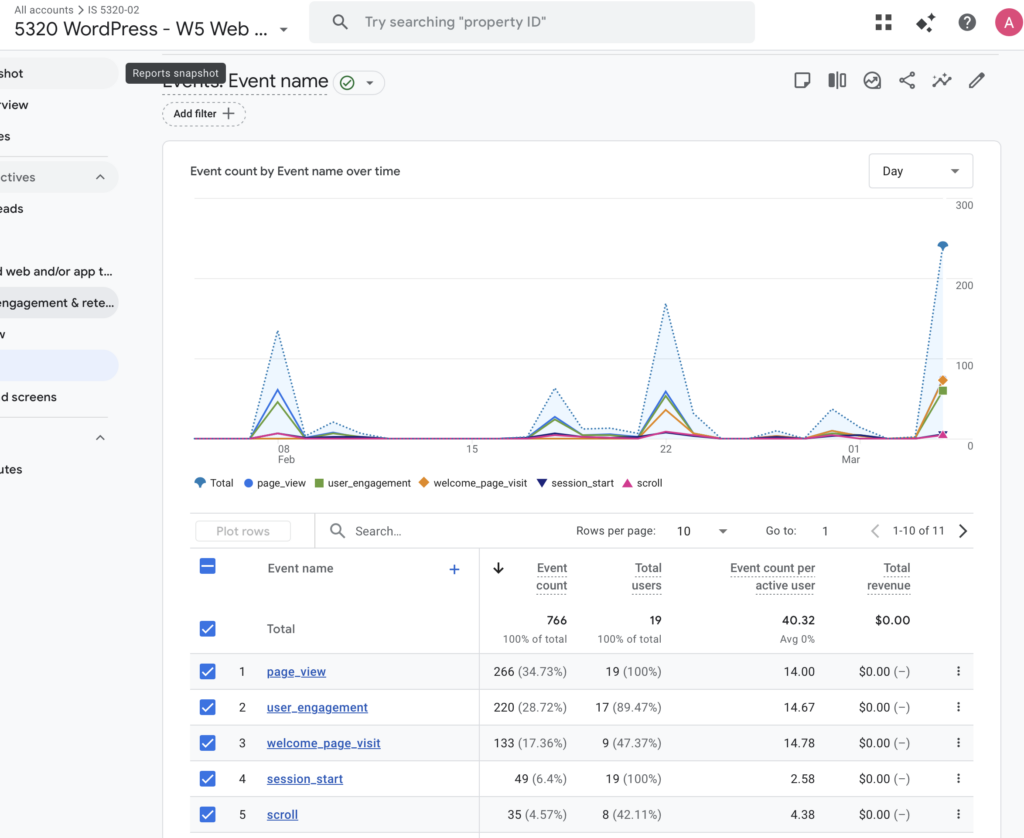
Summary of your “Event” in GA4 (add a screenshot) (one paragraph)
In GA4, I created and tested a custom event using Google Tag Manager to better understand how event tracking captures specific user actions beyond standard page views. The event was configured through a GA4 Event tag connected to my GA4 Configuration tag, with a trigger based on page views for a specific URL condition. After publishing and testing in Preview mode, I confirmed that the event fired correctly and appeared in GA4 under the Realtime and Event reports. Reviewing the event data helped me see how GA4 tracks user interactions at a more detailed level, allowing me to monitor engagement with specific content and better understand how visitors interact with newly created pages on my site.
Essay III.
Find and describe one of best use cases using custom events in GA4 (one paragraph)
One of the best use cases for custom events in GA4 is tracking high-intent user actions that are not automatically captured through standard page views, such as inquiry form interactions or specific content engagement. For example, on a photography website like mine, a custom event can be set up to track when a visitor views a key page (such as a portfolio or blog post), clicks an inquiry button, or reaches a confirmation page after submitting a contact form. This allows me to measure meaningful engagement rather than just traffic volume and helps identify which content drives conversions or deeper user interest. By using custom events, I can better understand user behavior, evaluate the effectiveness of specific pages, and make data-driven improvements to site content and design.